Gemini vs Claude Code: Which AI Coding Tool Should You Use in 2026?
This isn't another surface-level comparison rehashing feature lists. I've used both tools daily for months across real projects—building automation systems, refactoring legacy codebases, and shipping production features. Here's what actually matters when choosing between them.
Which AI Coding Tool Should You Use: Gemini or Claude Code?
Use Claude Code when you need to:
- Write complex, multi-file code that needs to work on first run
- Refactor existing codebases with confidence
- Execute and test code directly in your workflow
- Build automation scripts that interact with your file system
- Handle tasks requiring deep reasoning about code architecture
Use Gemini when you need to:
- Analyze massive codebases or documentation (1M+ tokens)
- Research APIs, libraries, or technical concepts
- Process large files (PDFs, specs, entire repos)
- Handle high-volume, simpler code generation tasks
- Get web-grounded, up-to-date technical information
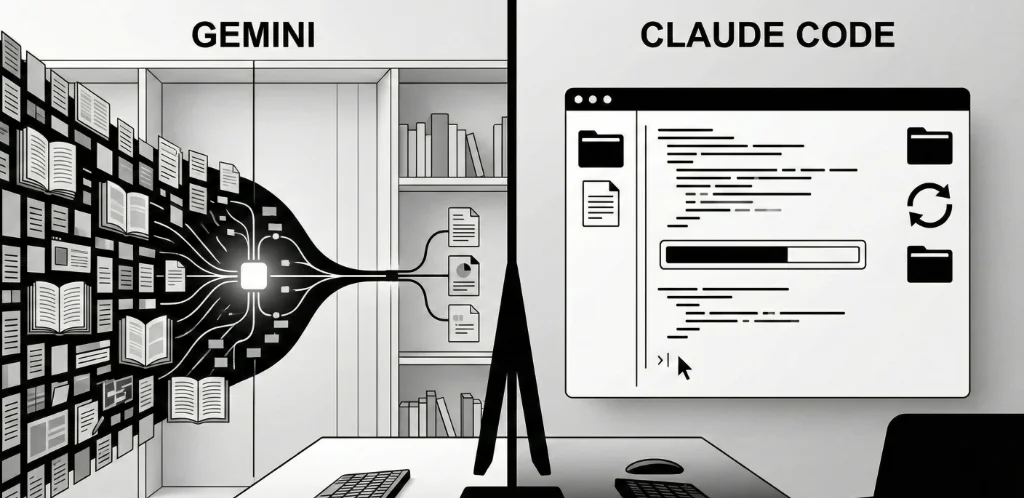
The short answer: Claude Code for building, Gemini for understanding. Most power users run both—Gemini to research, Claude Code to implement. The tools are complementary, not competitive.
The Core Difference: Execution vs. Analysis
Claude Code and Gemini represent fundamentally different philosophies about AI-assisted coding.
Claude Code is an agent. It runs in your terminal, reads your files, writes code, and executes commands. When you ask it to "build a script that scrapes this website," it doesn't just generate code—it creates the file, runs it, sees the error, fixes the bug, and runs again until it works. The loop between "think" and "do" is closed within the tool itself.
Gemini is an oracle. It has massive context (up to 2 million tokens), grounded web search, and strong analytical capabilities. When you paste an entire codebase and ask "how does authentication work here?", it synthesizes an answer from thousands of lines of code. But the execution is still on you—you copy the generated code, paste it, run it, and handle the iteration.
This distinction matters more than model benchmarks. A slightly less capable model that executes and iterates will often outperform a more capable model that just generates text you need to manually run.
Context Window: Where Gemini Dominates
The Numbers
- Gemini 2.0 Flash: 1 million tokens
- Gemini 1.5 Pro: 2 million tokens
- Claude 3.5 Sonnet/Opus: 200,000 tokens
Gemini's context window is 5-10x larger. For reference, 1 million tokens is roughly 750,000 words—an entire large codebase, all documentation, and your question, in a single prompt.
When This Matters
Context window size becomes critical when you need the AI to understand relationships across many files simultaneously:
- Legacy codebase analysis—understanding how 50+ files interact
- Architecture reviews—seeing patterns across an entire system
- Documentation processing—digesting entire API references
- Code search—finding where functionality lives across a large repo
When It Doesn't
For most day-to-day coding tasks, you're not using anywhere near 200K tokens. Writing a new feature, fixing a bug, refactoring a module—these tasks involve a handful of files at most. Claude's 200K context is sufficient for 95% of coding sessions. Claude Code compensates for smaller context by intelligently reading files on demand rather than loading everything upfront.
The Practical Verdict
If you're working with massive legacy codebases or need to process large documentation sets, Gemini's context window is a genuine advantage. For greenfield development or focused work on specific features, Claude's context is more than adequate.
Code Quality: Claude Code Takes the Edge
In my testing across hundreds of code generation tasks, Claude Code produces more reliable, production-ready code than Gemini. The differences are subtle but consistent:
Error Handling
Claude Code generates more comprehensive error handling by default. It anticipates edge cases, adds appropriate try/catch blocks, and includes meaningful error messages. Gemini often produces "happy path" code that works for the example but breaks on edge cases.
Code Style Consistency
Claude Code better matches the style of existing code in your project. It picks up on naming conventions, import patterns, and architectural choices. Gemini tends toward more generic patterns that may require adjustment to fit your codebase.
First-Run Success Rate
In my tracking, Claude Code's generated code runs successfully on first attempt roughly 75-80% of the time for moderately complex tasks. Gemini hovers around 60-65%. The 15-20 percentage point difference compounds when you're generating multiple scripts in a session.
Complex Refactoring
For multi-file refactoring—renaming functions across a codebase, extracting shared logic, migrating patterns—Claude Code handles the complexity better. It tracks dependencies, updates imports, and maintains consistency across files. Gemini often misses secondary changes needed for a refactor to work.
Why Claude Is Better at Code
Anthropic has explicitly optimized Claude for coding tasks. Claude Code's agentic architecture means it can test its own output and iterate—it learns from its mistakes within a session. Gemini's strength is breadth and context, not the deep code-specific optimization that Claude has received.
Speed and Cost: Gemini Wins on Economics
Pricing Comparison
| Model | Input (per 1M tokens) | Output (per 1M tokens) | Typical Session Cost |
|---|---|---|---|
| Gemini 2.0 Flash | $0.10 | $0.40 | $0.01-0.02 |
| Gemini 1.5 Pro | $1.25 | $5.00 | $0.10-0.20 |
| Claude 3.5 Sonnet | $3.00 | $15.00 | $0.30-0.50 |
| Claude 3 Opus | $15.00 | $75.00 | $1.50-3.00 |
| Claude Opus 4.5 | $15.00 | $75.00 | $1.50-3.00 |
Speed Comparison
Gemini 2.0 Flash is the fastest model in either ecosystem—responses typically come in under 2 seconds. Claude 3.5 Sonnet is fast but noticeably slower. Claude Opus models are thoughtful and thorough but can take 10-30 seconds for complex responses.
The Economics Math
For high-volume tasks—processing hundreds of files, running batch analysis, generating boilerplate—Gemini Flash is 10-30x cheaper than Claude. At $0.01 per request vs $0.30, the cost difference is dramatic at scale.
For mission-critical code where bugs are expensive to fix, Claude's higher quality may justify the premium. If Claude's code works 80% of the time vs Gemini's 65%, the debugging time saved often exceeds the API cost difference.
The Practical Verdict
Use Gemini Flash for high-volume, lower-complexity tasks. Use Claude for complex, accuracy-critical work. The cost difference is significant enough to matter at scale.
IDE Integration: Different Approaches
Claude Code's Approach
Claude Code runs in your terminal, not in an IDE extension. You invoke it from the command line, and it has direct access to your file system, git, and shell commands. It can:
- Read and write files directly
- Execute shell commands and interpret results
- Run tests and fix failures iteratively
- Manage git operations (commits, branches, diffs)
- Chain multiple operations in agentic workflows
The terminal-native approach means Claude Code works with any editor—VS Code, Vim, Emacs, whatever. It's not locked into a specific IDE ecosystem.
Gemini's Approach
Gemini integrates through IDE extensions and platforms:
- Google AI Studio — Web interface for direct API interaction
- IDE Extensions — Available for VS Code, JetBrains, and others
- Cursor Integration — Cursor supports Gemini as an alternative model
- API Access — Build custom integrations via REST API
Gemini's integration is more traditional—it generates code that you then copy or accept. It doesn't execute commands or modify files directly (though Cursor's agent mode can add some agentic capabilities).
The Practical Verdict
Claude Code's terminal integration provides a more powerful workflow for developers comfortable with command line. Gemini's IDE extensions offer a gentler learning curve for those who prefer staying in their editor.
Specialized Use Cases: When Each Tool Shines
Claude Code Excels At
Building Automation Scripts
Claude Code's ability to execute and iterate makes it ideal for building automation. You describe what you want, it writes the script, runs it, sees the error, fixes it, and runs again. A web scraping script that would take 10 iterations manually happens in a single conversation.
Complex Refactoring
Multi-file refactoring requires tracking dependencies, updating imports, and maintaining consistency. Claude Code handles this complexity better than any other tool I've used. "Rename this function across the codebase and update all call sites" just works.
Debugging
You paste an error, Claude Code reads the relevant files, understands the context, and often fixes the bug directly. The ability to run the code and verify the fix closes the debugging loop faster than tools that just suggest changes.
Writing Tests
Claude Code can read your implementation, generate comprehensive tests, run them, and fix failures until they pass. Test generation becomes a single command rather than a back-and-forth process.
Gemini Excels At
Codebase Understanding
Paste an entire codebase into Gemini and ask "how does the payment flow work?" It synthesizes an answer from thousands of lines of code. This is invaluable for onboarding to new projects or understanding legacy systems.
Documentation Processing
When you need to understand a new API, library, or framework, Gemini can process the entire documentation set. "Read this 200-page API reference and tell me how to implement webhook authentication" produces actionable answers.
Research and Exploration
Gemini's web grounding means it has access to current information. "What's the current best practice for Next.js 15 app router authentication?" returns up-to-date guidance, not outdated patterns from training data.
High-Volume Processing
When you need to process hundreds of files, generate boilerplate for many components, or run bulk analysis, Gemini Flash's speed and cost make it the practical choice.
The Hybrid Workflow: Using Both Tools
The most effective approach isn't choosing one tool—it's using both for their strengths. Here's how I structure my workflow:
Phase 1: Research (Gemini)
- Paste relevant documentation, API specs, or codebase sections
- Ask clarifying questions about architecture and approach
- Get up-to-date information about libraries and best practices
- Explore options before committing to implementation
Phase 2: Implementation (Claude Code)
- Describe the feature or fix based on research findings
- Let Claude Code write, execute, and iterate on the code
- Review the changes it makes to your files
- Run tests and let Claude Code fix any failures
Phase 3: Verification (Both)
- Use Claude Code to run the full test suite
- Use Gemini to review the implementation against requirements
- Document changes with either tool
This hybrid approach leverages Gemini's context and research strengths while using Claude Code's execution and iteration capabilities. The tools complement rather than compete.
Decision Framework: 5 Questions to Choose Your Tool
Before starting a task, ask yourself:
- Do I need to execute code as part of the workflow?
Yes → Claude Code. It can run and iterate on code directly.
No → Either tool works. - Am I working with more than 200K tokens of context?
Yes → Gemini. Its larger context window handles massive codebases.
No → Either tool works. - Is this a high-volume, simpler task?
Yes → Gemini Flash. It's 10-30x cheaper for bulk processing.
No → Consider Claude for quality. - Do I need the most current information?
Yes → Gemini. Web grounding provides up-to-date answers.
No → Either tool works. - Is this complex, production-critical code?
Yes → Claude Code. Higher first-run success rate.
No → Either tool works based on other factors.
Most tasks will have clear answers to one or two of these questions. Let those drive your choice.
Common Mistakes When Choosing AI Coding Tools
Mistake 1: Picking Based on Benchmarks
The trap: Choosing the tool with higher scores on HumanEval or other coding benchmarks.
The reality: Benchmarks measure isolated code generation. Real-world coding involves context management, iteration, file operations, and execution—none of which benchmarks capture.
The fix: Test tools on YOUR actual tasks. A tool that scores 5% lower on benchmarks but fits your workflow will outperform the "better" tool that doesn't.
Mistake 2: Ignoring Cost at Scale
The trap: Using the most capable model for every task.
The reality: Claude Opus at $75/million output tokens adds up fast. Many tasks don't need the most powerful model.
The fix: Match model capability to task complexity. Use Gemini Flash for simple tasks, Claude Sonnet for standard coding, Opus only for genuinely complex work.
Mistake 3: Expecting One Tool to Do Everything
The trap: Forcing all tasks through one tool because switching is inconvenient.
The reality: Each tool has genuine strengths. Gemini's context window and Claude's execution are both valuable. Limiting yourself to one tool means suboptimal results for some tasks.
The fix: Set up both tools. Build muscle memory for switching based on task type. The 30 seconds to switch tools is worth the better output.
Mistake 4: Not Verifying Generated Code
The trap: Accepting AI-generated code without review because "the AI is really good."
The reality: Even the best models hallucinate, introduce subtle bugs, and make architectural choices you might not want. 75% first-run success means 25% failures.
The fix: Always review generated code. Run tests. Verify behavior matches intent. AI accelerates coding, it doesn't eliminate the need for engineering judgment.
Mistake 5: Overloading Context
The trap: Pasting your entire codebase into every prompt because "more context is better."
The reality: Models perform worse with irrelevant context. Noise degrades signal. And you're paying for all those tokens.
The fix: Curate context intentionally. Include only the files relevant to your current task. Let Claude Code read files on demand rather than front-loading everything.
Verified Data & Methodology
Sources & Context:
- Pricing data from official Anthropic and Google AI documentation as of January 2026
- First-run success rates based on personal tracking across 200+ code generation tasks over 3 months
- Context window specifications from official model documentation
- Speed comparisons from informal testing—not rigorous benchmarks
- Claude Code agentic capabilities based on Anthropic's published documentation
This comparison reflects my experience and testing methodology. Your results may vary based on use case, coding style, and specific tasks. Both tools are actively developed—capabilities and pricing may change.
The Bottom Line
Gemini and Claude Code are complementary tools, not competitors.
- Use Gemini for research, analysis, and processing large codebases—its massive context window and web grounding are unmatched
- Use Claude Code for implementation, refactoring, and debugging—its agentic execution and code quality are superior
- The hybrid workflow (Gemini for understanding, Claude Code for doing) produces better results than either tool alone
- Match tool cost to task complexity—Gemini Flash for volume, Claude for quality-critical work
The developers winning in 2026 aren't the ones with the "best" AI tool—they're the ones who've learned when to use which tool. Stop looking for a single answer. Build a toolkit.
Both tools are available, both have free tiers or affordable pricing, and both will make you more productive. The only wrong choice is not using either.
Book a free 30-minute consultation →
We'll assess your current workflow and recommend the optimal tool configuration for your specific use case.
Related Articles

Ready to Automate Your Business?
Book a free consultation to discuss how AI automation can save you 40+ hours per month.
Book Free Consultation